
Dynamic rules
A rule makes a widget property depend on a variable: "if CPU is above 80, make the background red and blink". Click the lightning-bolt button next to a property to build one.
Properties that can be dynamic
Background, text color, border color, animation, icon and text. A dynamic text or icon result may itself contain {variables}.
Building a rule
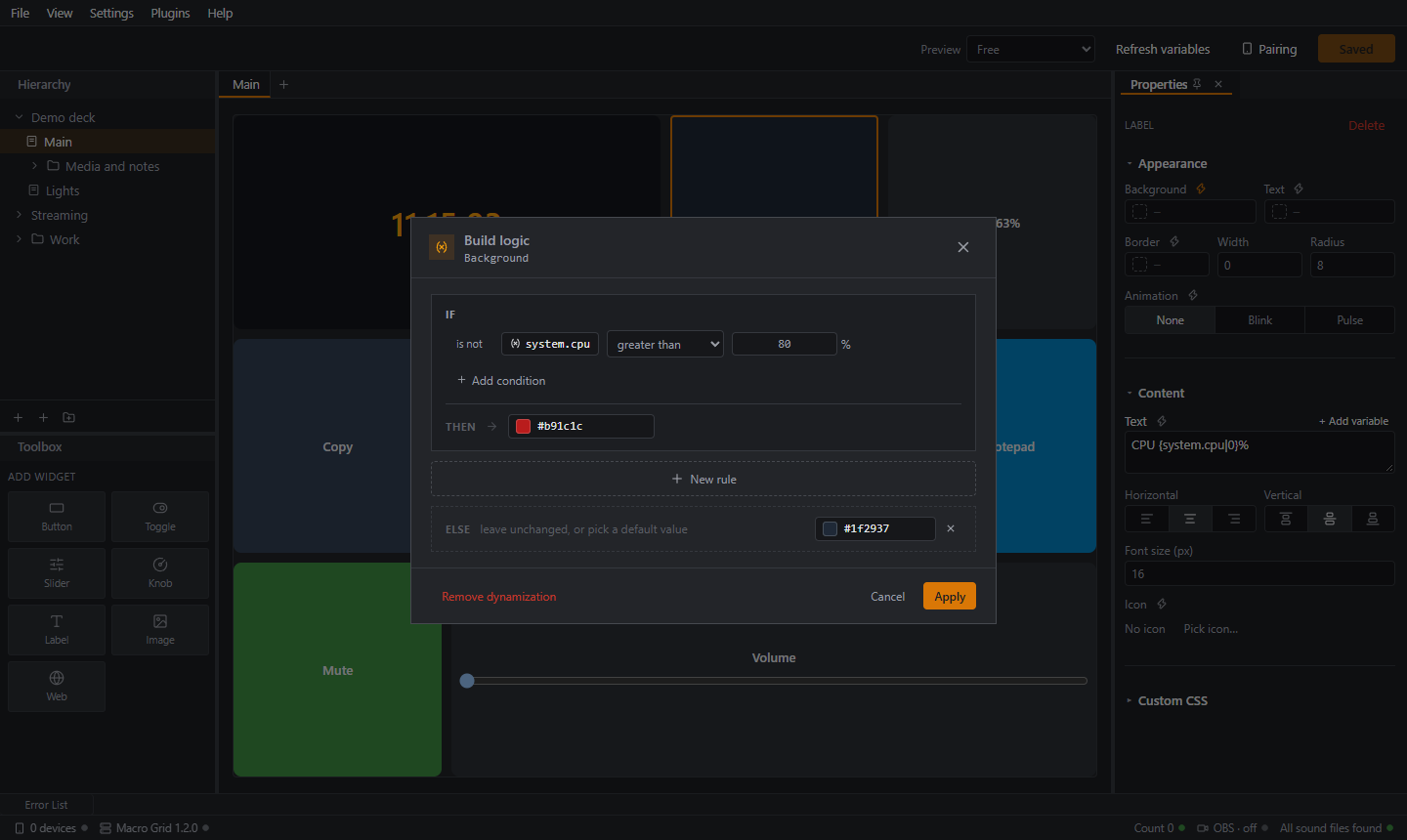
The Build logic window works like this:
- If: pick a variable, an operator and a value.
- Combine conditions with AND, OR or XOR, or negate one with is not.
- Then: choose the color, animation, icon or text to apply.
- Else if: add more cases. The first matching case wins.
- Else: a default value, or leave it unchanged so the widget's own static value shows.
- Apply.
Operators: greater than, greater or equal, less than, less or equal, equal, not equal, between.
Use Remove dynamization to go back to a fixed value.
Values to type
Type numbers as they are (80), and text without quotes (live). For booleans such as system.audio.muted, type true or false (letters may be upper or lower case). 1 and 0 do not match a boolean yet.
Example: a busy CPU warning
| Property | Rule |
|---|---|
| Background | If system.cpu greater than 80 then red; else if greater than 50 then amber; else dark grey |
| Animation | If system.cpu greater than 80 then Blink |
Full walkthrough: A live CPU tile.
Safe by design
Rules are plain data: they can read a variable and compare it. There is no scripting and no code execution.